> ## Documentation Index
> Fetch the complete documentation index at: https://docs.flipt.io/llms.txt
> Use this file to discover all available pages before exploring further.
# Commit Signing Setup
> Step-by-step guide to configure GPG commit signing with GitHub and other Git providers
This guide will show you how to set up GPG commit signing for Flipt v2 to provide cryptographic verification of your configuration changes.
This functionality is only available in Flipt v2 Pro. [Learn
more](/v2/licensing) about our commercial license or purchase a
[monthly](https://getflipt.co/pro/monthly) or
[annual](https://getflipt.co/pro/annual) license.
## Prerequisites
* [Flipt v2](/v2/quickstart)
* A Flipt v2 environment configured with [Git Sync](/v2/guides/operations/environments/git-sync)
* [Secrets management](/v2/configuration/secrets) configured
* A Flipt v2 Pro license or trial license
This guide uses GitHub as an example, but the process is similar for GitLab,
Gitea, and other Git providers.
## 1. Generate a GPG Key
If you don't have a GPG key, create one specifically for Flipt:
```bash theme={null}
# Generate a new GPG key
gpg --full-generate-key
# Select RSA and RSA (default)
# Choose 4096 bits for maximum security
# Set expiration (recommended: 2 years)
# Enter details:
# Real name: Flipt Bot
# Email: flipt@yourcompany.com
# Comment: Flipt configuration signing
```
## 2. Export the Private Key
Export your private key for storage in your secrets provider:
```bash theme={null}
# Export private key (replace with your key ID)
gpg --export-secret-keys --armor flipt@yourcompany.com > flipt-signing-key.asc
# The key ID can be found with:
gpg --list-secret-keys flipt@yourcompany.com
```
## 3. Store Key in Secrets Provider
Store the private key securely using your configured secrets provider:
**Vault Example:**
```bash theme={null}
vault kv put secret/flipt/signing-key private_key=@flipt-signing-key.asc
```
## 4. Upload Public Key to GitHub
1. Export your public key:
```bash theme={null}
# Export public key
gpg --export --armor flipt@yourcompany.com > flipt-public-key.asc
```
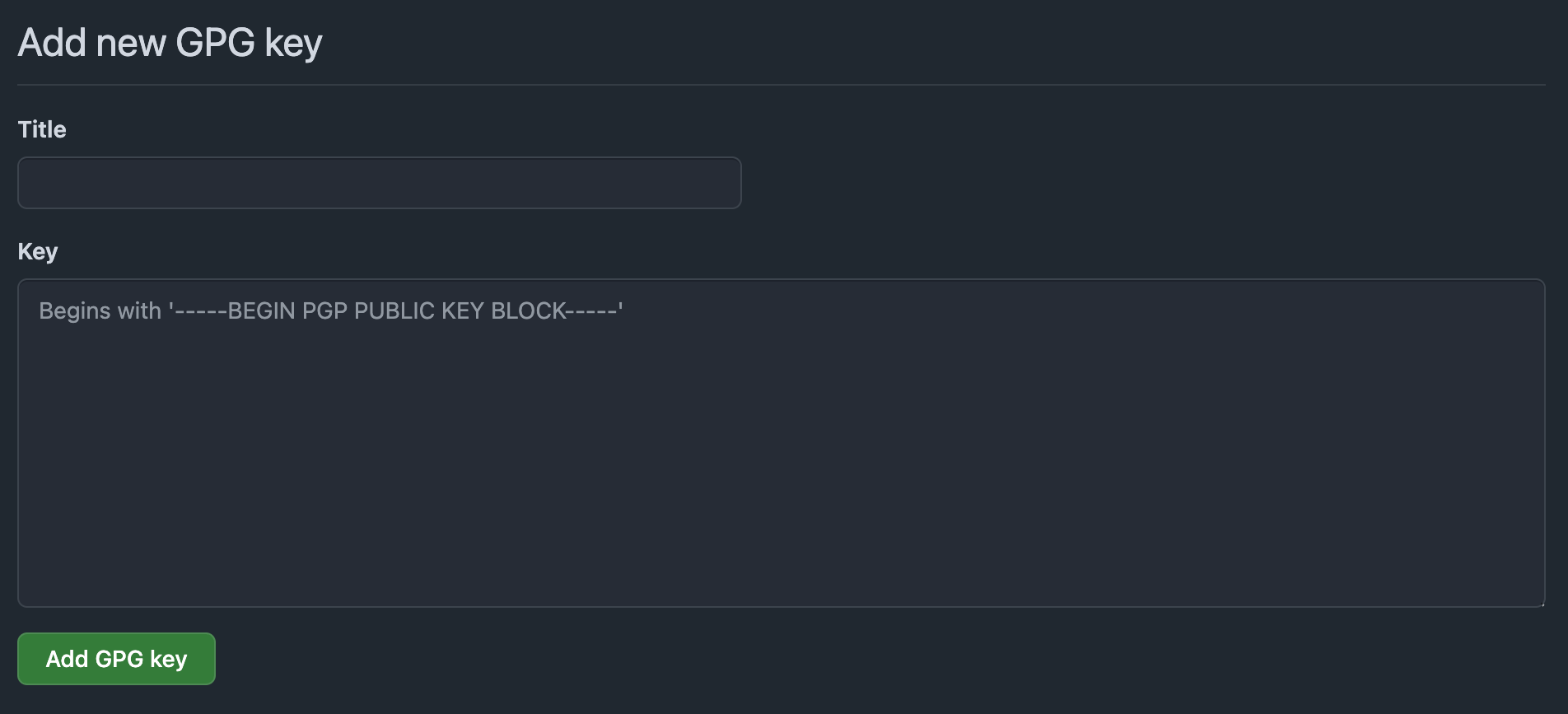
2. Go to [GitHub Settings > SSH and GPG keys](https://github.com/settings/keys)
3. Click **"New GPG key"**
4. Copy and paste the contents of `flipt-public-key.asc`
5. Click **"Add GPG key"**
 ## 5. Configure Flipt
Add commit signing configuration to your Flipt configuration file:
```yaml theme={null}
storage:
default:
signature:
enabled: true
type: "gpg"
key_ref:
provider: "vault" # Your secrets provider
path: "flipt/signing-key" # Path to private key in secrets
key: "private_key" # Key name within the secret
name: "Flipt Bot" # Signer name
email: "flipt@yourcompany.com" # Signer email
key_id: "flipt@yourcompany.com" # GPG key identifier
```
## 6. Deploy and Start Flipt
Deploy your updated configuration and start or restart your Flipt server.
Flipt will now automatically sign all commits to your flag configuration repository.
## 7. Verify Commit Signing
After enabling signing, verify that new commits are being signed:
```bash theme={null}
# Clone your flag repository
git clone https://github.com/company/flags.git
cd flags
# Check recent commits for signatures
git log --show-signature -5
# Look for GPG signature verification
git verify-commit HEAD
```
### GitHub Verification
On GitHub, signed commits will display:
* ✅ **Verified** badge next to the commit
* GPG key information when clicking the badge
* Signature details in the commit view
## Troubleshooting
### Commits Not Showing as Verified
If commits aren't showing as verified:
1. **Check public key upload**: Ensure the public key is added to your Git hosting service
2. **Verify email match**: The email in the GPG key must match the configured email
3. **Confirm key validity**: Ensure the GPG key hasn't expired
4. **Check key ID**: Verify the key\_id matches your actual GPG key
### Common Issues
**Signing Failures**
```
Error: failed to sign commit: gpg key not found
```
* Verify the key exists in your secrets provider
* Check the key reference path and key name
* Ensure the secrets provider is accessible
**Key Loading Errors**
```
Error: failed to load GPG private key
```
* Verify secrets provider connectivity
* Check authentication credentials for your secrets provider
* Ensure the private key is in valid ASCII armored format
**Permission Errors**
```
Error: insufficient permissions to access secret
```
* Verify Flipt has the necessary permissions in your secrets provider
* Check authentication method configuration
* Review access policies for the signing key secret
### Debug Configuration
Enable debug logging to troubleshoot signing issues:
```yaml theme={null}
log:
level: "debug"
```
### Validation Commands
Test your GPG key setup:
```bash theme={null}
# Check if GPG key can be loaded
gpg --import /path/to/private-key.asc
# Verify key information
gpg --list-secret-keys your-email@company.com
# Test signing
echo "test" | gpg --armor --sign --default-key your-email@company.com
```
## Conclusion
This guide showed how to configure GPG commit signing for Flipt v2 with GitHub. Your flag configuration changes will now be cryptographically signed, providing enhanced security and audit capabilities.
You can now use Flipt to manage your flags with verified commit signatures that prove the authenticity and integrity of your configuration changes.
If you have any questions or feedback, please reach out to the Flipt team on [Discord](https://discord.gg/flipt) or [GitHub Discussions](https://github.com/flipt-io/flipt/discussions).
***
**References:**
* [Flipt v2 Commit Signing Configuration](/v2/configuration/commit-signing)
* [Flipt v2 Secrets Configuration](/v2/configuration/secrets)
* [Flipt v2 Git Sync](/v2/guides/operations/environments/git-sync)
* [GitHub: Adding a GPG key to your GitHub account](https://docs.github.com/en/authentication/managing-commit-signature-verification/adding-a-gpg-key-to-your-github-account)
## 5. Configure Flipt
Add commit signing configuration to your Flipt configuration file:
```yaml theme={null}
storage:
default:
signature:
enabled: true
type: "gpg"
key_ref:
provider: "vault" # Your secrets provider
path: "flipt/signing-key" # Path to private key in secrets
key: "private_key" # Key name within the secret
name: "Flipt Bot" # Signer name
email: "flipt@yourcompany.com" # Signer email
key_id: "flipt@yourcompany.com" # GPG key identifier
```
## 6. Deploy and Start Flipt
Deploy your updated configuration and start or restart your Flipt server.
Flipt will now automatically sign all commits to your flag configuration repository.
## 7. Verify Commit Signing
After enabling signing, verify that new commits are being signed:
```bash theme={null}
# Clone your flag repository
git clone https://github.com/company/flags.git
cd flags
# Check recent commits for signatures
git log --show-signature -5
# Look for GPG signature verification
git verify-commit HEAD
```
### GitHub Verification
On GitHub, signed commits will display:
* ✅ **Verified** badge next to the commit
* GPG key information when clicking the badge
* Signature details in the commit view
## Troubleshooting
### Commits Not Showing as Verified
If commits aren't showing as verified:
1. **Check public key upload**: Ensure the public key is added to your Git hosting service
2. **Verify email match**: The email in the GPG key must match the configured email
3. **Confirm key validity**: Ensure the GPG key hasn't expired
4. **Check key ID**: Verify the key\_id matches your actual GPG key
### Common Issues
**Signing Failures**
```
Error: failed to sign commit: gpg key not found
```
* Verify the key exists in your secrets provider
* Check the key reference path and key name
* Ensure the secrets provider is accessible
**Key Loading Errors**
```
Error: failed to load GPG private key
```
* Verify secrets provider connectivity
* Check authentication credentials for your secrets provider
* Ensure the private key is in valid ASCII armored format
**Permission Errors**
```
Error: insufficient permissions to access secret
```
* Verify Flipt has the necessary permissions in your secrets provider
* Check authentication method configuration
* Review access policies for the signing key secret
### Debug Configuration
Enable debug logging to troubleshoot signing issues:
```yaml theme={null}
log:
level: "debug"
```
### Validation Commands
Test your GPG key setup:
```bash theme={null}
# Check if GPG key can be loaded
gpg --import /path/to/private-key.asc
# Verify key information
gpg --list-secret-keys your-email@company.com
# Test signing
echo "test" | gpg --armor --sign --default-key your-email@company.com
```
## Conclusion
This guide showed how to configure GPG commit signing for Flipt v2 with GitHub. Your flag configuration changes will now be cryptographically signed, providing enhanced security and audit capabilities.
You can now use Flipt to manage your flags with verified commit signatures that prove the authenticity and integrity of your configuration changes.
If you have any questions or feedback, please reach out to the Flipt team on [Discord](https://discord.gg/flipt) or [GitHub Discussions](https://github.com/flipt-io/flipt/discussions).
***
**References:**
* [Flipt v2 Commit Signing Configuration](/v2/configuration/commit-signing)
* [Flipt v2 Secrets Configuration](/v2/configuration/secrets)
* [Flipt v2 Git Sync](/v2/guides/operations/environments/git-sync)
* [GitHub: Adding a GPG key to your GitHub account](https://docs.github.com/en/authentication/managing-commit-signature-verification/adding-a-gpg-key-to-your-github-account)