> ## Documentation Index
> Fetch the complete documentation index at: https://docs.flipt.io/llms.txt
> Use this file to discover all available pages before exploring further.
# Analytics
> This document describes various configuration mechanisms for controlling analytics for Flipt v2.
## Analytics
Flipt includes functionality for reporting analytical data to a configurable storage engine.
Currently, Flipt has support for collecting data into the following storage engines:
* [ClickHouse](https://clickhouse.com/)
* [Prometheus](https://prometheus.io/)
The data that gets collected currently includes:
* Flag Evaluation Count
Once a storage engine is configured, these analytics are viewable in the UI allowing users to visualize up to 24 hours of data for each metric.
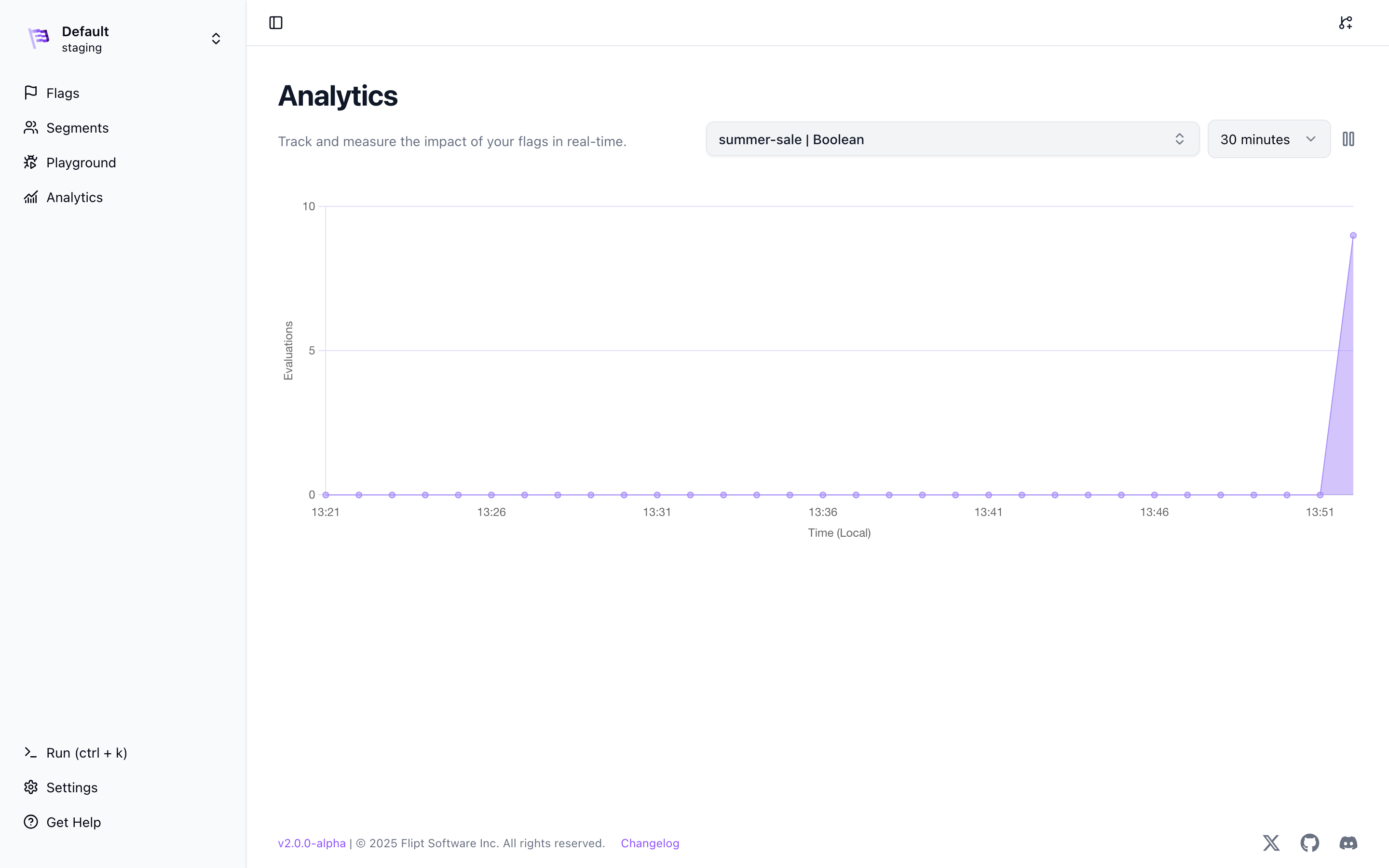 The image above shows the past 30 minutes of the flag `summer-sale` evaluation counts.
### Origin
Analytics are currently only collected as they pass through the evaluation server. This means that analytics will be captured if you are using the REST or GRPC APIs via one of our [Server SDKs](/v2/integration/server/rest) or [GRPC SDKs](/v1/integration/server/grpc) for evaluations.
We have plans to support collecting analytics for [Client-Side](/v2/integration/client) evaluations in the future.
## ClickHouse
You can use a self-hosted ClickHouse instance or a [managed instance](https://clickhouse.com/cloud/) to store your analytics data.
We highly **recommend** using a separate database for analytics produced by Flipt. This ensures that Flipt analytic data can be logically isolated from the rest of your Clickhouse data.
The analytics database must be created before Flipt will be able to write
analytical data and run any migrations. See our
[migrate](/v2/cli/commands/migrate) command for more info.
To create a database for Flipt analytics, you can use the following SQL:
```sql theme={null}
CREATE DATABASE IF NOT EXISTS flipt_analytics_v2;
```
See the [ClickHouse documentation](https://clickhouse.com/docs) for more information on how to get started with ClickHouse.
### Configuration
To configure Flipt to use ClickHouse for analytics, you will need to add the following configuration to your `config.yml` file or environment variables:
```bash theme={null}
FLIPT_ANALYTICS_STORAGE_CLICKHOUSE_ENABLED=true
FLIPT_ANALYTICS_STORAGE_CLICKHOUSE_URL=clickhouse://clickhouse:9000/flipt_analytics_v2
```
```yaml theme={null}
analytics:
storage:
clickhouse:
enabled: true
url: clickhouse://clickhouse:9000/flipt_analytics_v2
```
## Prometheus
You can use any [Prometheus](https://prometheus.io/docs/introduction/overview/) server to store your analytics data.
### Configuration
To configure Flipt to use Prometheus for analytics, you will need to add the following configuration to your `config.yml` file or environment variables:
```bash theme={null}
FLIPT_ANALYTICS_STORAGE_PROMETHEUS_ENABLED=true
FLIPT_ANALYTICS_STORAGE_PROMETHEUS_URL=http://prometheus:9090
```
```yaml theme={null}
analytics:
storage:
prometheus:
enabled: true
url: http://prometheus:9090
```
### Custom Headers
You can also add custom headers to the Prometheus requests by setting the `analytics.storage.prometheus.headers` configuration property. This can be useful if you are using a proxy or need to add additional authentication headers.
```yaml theme={null}
analytics:
storage:
prometheus:
headers:
"Authorization": "Bearer "
```
### AWS SigV4 Authentication
If you are using [Amazon Managed Service for Prometheus (AMP)](https://aws.amazon.com/prometheus/), you can configure Flipt to authenticate requests using [AWS Signature Version 4 (SigV4)](https://docs.aws.amazon.com/general/latest/gr/signature-version-4.html).
```yaml theme={null}
analytics:
storage:
prometheus:
enabled: true
url: https://aps-workspaces.us-east-1.amazonaws.com/workspaces/
sigv4:
enabled: true
```
```bash theme={null}
FLIPT_ANALYTICS_STORAGE_PROMETHEUS_ENABLED=true
FLIPT_ANALYTICS_STORAGE_PROMETHEUS_URL=https://aps-workspaces.us-east-1.amazonaws.com/workspaces/
FLIPT_ANALYTICS_STORAGE_PROMETHEUS_SIGV4_ENABLED=true
FLIPT_ANALYTICS_STORAGE_PROMETHEUS_SIGV4_REGION=us-east-1
FLIPT_ANALYTICS_STORAGE_PROMETHEUS_SIGV4_ACCESS_KEY=
FLIPT_ANALYTICS_STORAGE_PROMETHEUS_SIGV4_SECRET_KEY=
```
If `access_key` and `secret_key` are not provided, Flipt falls back to the [default AWS credential chain](https://docs.aws.amazon.com/sdk-for-go/v1/developer-guide/configuring-sdk.html#specifying-credentials) (environment variables, shared credentials file, IAM instance profile, etc.).
You can also assume an IAM role by specifying `role_arn`:
```yaml theme={null}
analytics:
storage:
prometheus:
enabled: true
url: https://aps-workspaces.us-east-1.amazonaws.com/workspaces/
sigv4:
enabled: true
region: us-east-1
role_arn: arn:aws:iam:::role/
```
| Property | Description | Default |
| ---------------------------------------------- | ----------------------------------------------- | ------- |
| analytics.storage.prometheus.sigv4.enabled | Enable Prometheus SigV4 support | false |
| analytics.storage.prometheus.sigv4.region | AWS region for SigV4 signing | |
| analytics.storage.prometheus.sigv4.access\_key | AWS access key ID | |
| analytics.storage.prometheus.sigv4.secret\_key | AWS secret access key | |
| analytics.storage.prometheus.sigv4.profile | AWS credentials profile name | |
| analytics.storage.prometheus.sigv4.role\_arn | ARN of an IAM role to assume for authentication | |
The image above shows the past 30 minutes of the flag `summer-sale` evaluation counts.
### Origin
Analytics are currently only collected as they pass through the evaluation server. This means that analytics will be captured if you are using the REST or GRPC APIs via one of our [Server SDKs](/v2/integration/server/rest) or [GRPC SDKs](/v1/integration/server/grpc) for evaluations.
We have plans to support collecting analytics for [Client-Side](/v2/integration/client) evaluations in the future.
## ClickHouse
You can use a self-hosted ClickHouse instance or a [managed instance](https://clickhouse.com/cloud/) to store your analytics data.
We highly **recommend** using a separate database for analytics produced by Flipt. This ensures that Flipt analytic data can be logically isolated from the rest of your Clickhouse data.
The analytics database must be created before Flipt will be able to write
analytical data and run any migrations. See our
[migrate](/v2/cli/commands/migrate) command for more info.
To create a database for Flipt analytics, you can use the following SQL:
```sql theme={null}
CREATE DATABASE IF NOT EXISTS flipt_analytics_v2;
```
See the [ClickHouse documentation](https://clickhouse.com/docs) for more information on how to get started with ClickHouse.
### Configuration
To configure Flipt to use ClickHouse for analytics, you will need to add the following configuration to your `config.yml` file or environment variables:
```bash theme={null}
FLIPT_ANALYTICS_STORAGE_CLICKHOUSE_ENABLED=true
FLIPT_ANALYTICS_STORAGE_CLICKHOUSE_URL=clickhouse://clickhouse:9000/flipt_analytics_v2
```
```yaml theme={null}
analytics:
storage:
clickhouse:
enabled: true
url: clickhouse://clickhouse:9000/flipt_analytics_v2
```
## Prometheus
You can use any [Prometheus](https://prometheus.io/docs/introduction/overview/) server to store your analytics data.
### Configuration
To configure Flipt to use Prometheus for analytics, you will need to add the following configuration to your `config.yml` file or environment variables:
```bash theme={null}
FLIPT_ANALYTICS_STORAGE_PROMETHEUS_ENABLED=true
FLIPT_ANALYTICS_STORAGE_PROMETHEUS_URL=http://prometheus:9090
```
```yaml theme={null}
analytics:
storage:
prometheus:
enabled: true
url: http://prometheus:9090
```
### Custom Headers
You can also add custom headers to the Prometheus requests by setting the `analytics.storage.prometheus.headers` configuration property. This can be useful if you are using a proxy or need to add additional authentication headers.
```yaml theme={null}
analytics:
storage:
prometheus:
headers:
"Authorization": "Bearer "
```
### AWS SigV4 Authentication
If you are using [Amazon Managed Service for Prometheus (AMP)](https://aws.amazon.com/prometheus/), you can configure Flipt to authenticate requests using [AWS Signature Version 4 (SigV4)](https://docs.aws.amazon.com/general/latest/gr/signature-version-4.html).
```yaml theme={null}
analytics:
storage:
prometheus:
enabled: true
url: https://aps-workspaces.us-east-1.amazonaws.com/workspaces/
sigv4:
enabled: true
```
```bash theme={null}
FLIPT_ANALYTICS_STORAGE_PROMETHEUS_ENABLED=true
FLIPT_ANALYTICS_STORAGE_PROMETHEUS_URL=https://aps-workspaces.us-east-1.amazonaws.com/workspaces/
FLIPT_ANALYTICS_STORAGE_PROMETHEUS_SIGV4_ENABLED=true
FLIPT_ANALYTICS_STORAGE_PROMETHEUS_SIGV4_REGION=us-east-1
FLIPT_ANALYTICS_STORAGE_PROMETHEUS_SIGV4_ACCESS_KEY=
FLIPT_ANALYTICS_STORAGE_PROMETHEUS_SIGV4_SECRET_KEY=
```
If `access_key` and `secret_key` are not provided, Flipt falls back to the [default AWS credential chain](https://docs.aws.amazon.com/sdk-for-go/v1/developer-guide/configuring-sdk.html#specifying-credentials) (environment variables, shared credentials file, IAM instance profile, etc.).
You can also assume an IAM role by specifying `role_arn`:
```yaml theme={null}
analytics:
storage:
prometheus:
enabled: true
url: https://aps-workspaces.us-east-1.amazonaws.com/workspaces/
sigv4:
enabled: true
region: us-east-1
role_arn: arn:aws:iam:::role/
```
| Property | Description | Default |
| ---------------------------------------------- | ----------------------------------------------- | ------- |
| analytics.storage.prometheus.sigv4.enabled | Enable Prometheus SigV4 support | false |
| analytics.storage.prometheus.sigv4.region | AWS region for SigV4 signing | |
| analytics.storage.prometheus.sigv4.access\_key | AWS access key ID | |
| analytics.storage.prometheus.sigv4.secret\_key | AWS secret access key | |
| analytics.storage.prometheus.sigv4.profile | AWS credentials profile name | |
| analytics.storage.prometheus.sigv4.role\_arn | ARN of an IAM role to assume for authentication | |