> ## Documentation Index
> Fetch the complete documentation index at: https://docs.flipt.io/llms.txt
> Use this file to discover all available pages before exploring further.
# Concepts
> This document describes the basic concepts of Flipt v2.
More information on how to use Flipt is noted in the [Quickstart](/v2/quickstart) documentation.
## Environments
Environments are a new concept in Flipt v2. They are a way to organize your namespaces, feature flags and configurations and keep them separate from each other.
By default, Flipt v2 will create a single environment called `default` along with the `default` namespace.
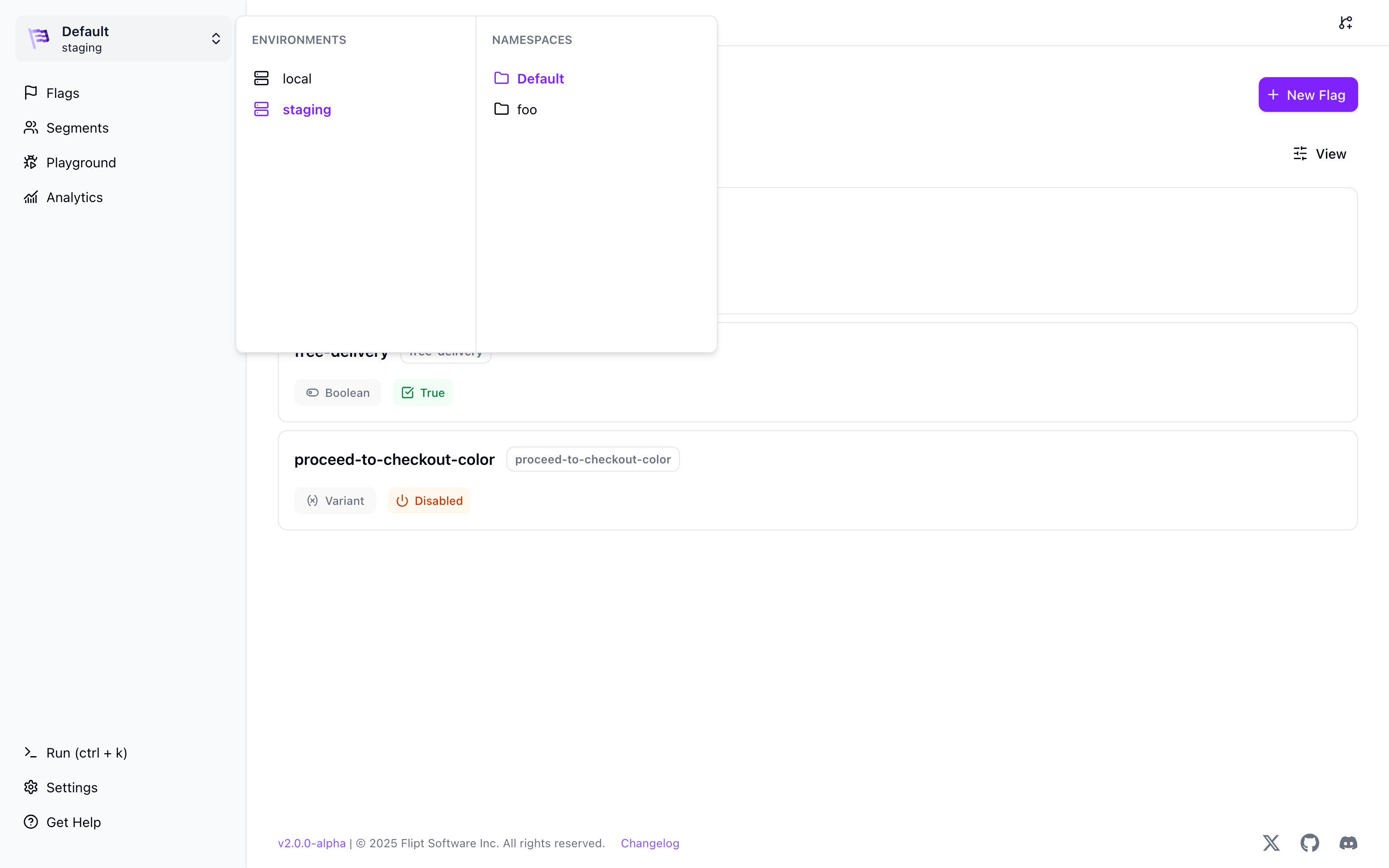 Environments are managed via configuration files as they are also coupled to how you store your configuration data. See the [Environments](/v2/configuration/environments) documentation for more.
All data created in one environment is only accessible within that environment, meaning namespaces, flags, segments, etc must be created in each environment in which they're to be used.
If an environment isn't selected then the 'Default' environment is used.
You can create as many environments as you want. Each environment can have its own namespaces, feature flags and configurations.
## Branches
Branches are a way to create a copy of an environment. This allows you to test changes to your feature flags and configurations in a separate branch without affecting your users in production.
Branches are created from an existing environment. Branches copy the base environment data and are completely independent of each other after creation.
Environments are managed via configuration files as they are also coupled to how you store your configuration data. See the [Environments](/v2/configuration/environments) documentation for more.
All data created in one environment is only accessible within that environment, meaning namespaces, flags, segments, etc must be created in each environment in which they're to be used.
If an environment isn't selected then the 'Default' environment is used.
You can create as many environments as you want. Each environment can have its own namespaces, feature flags and configurations.
## Branches
Branches are a way to create a copy of an environment. This allows you to test changes to your feature flags and configurations in a separate branch without affecting your users in production.
Branches are created from an existing environment. Branches copy the base environment data and are completely independent of each other after creation.
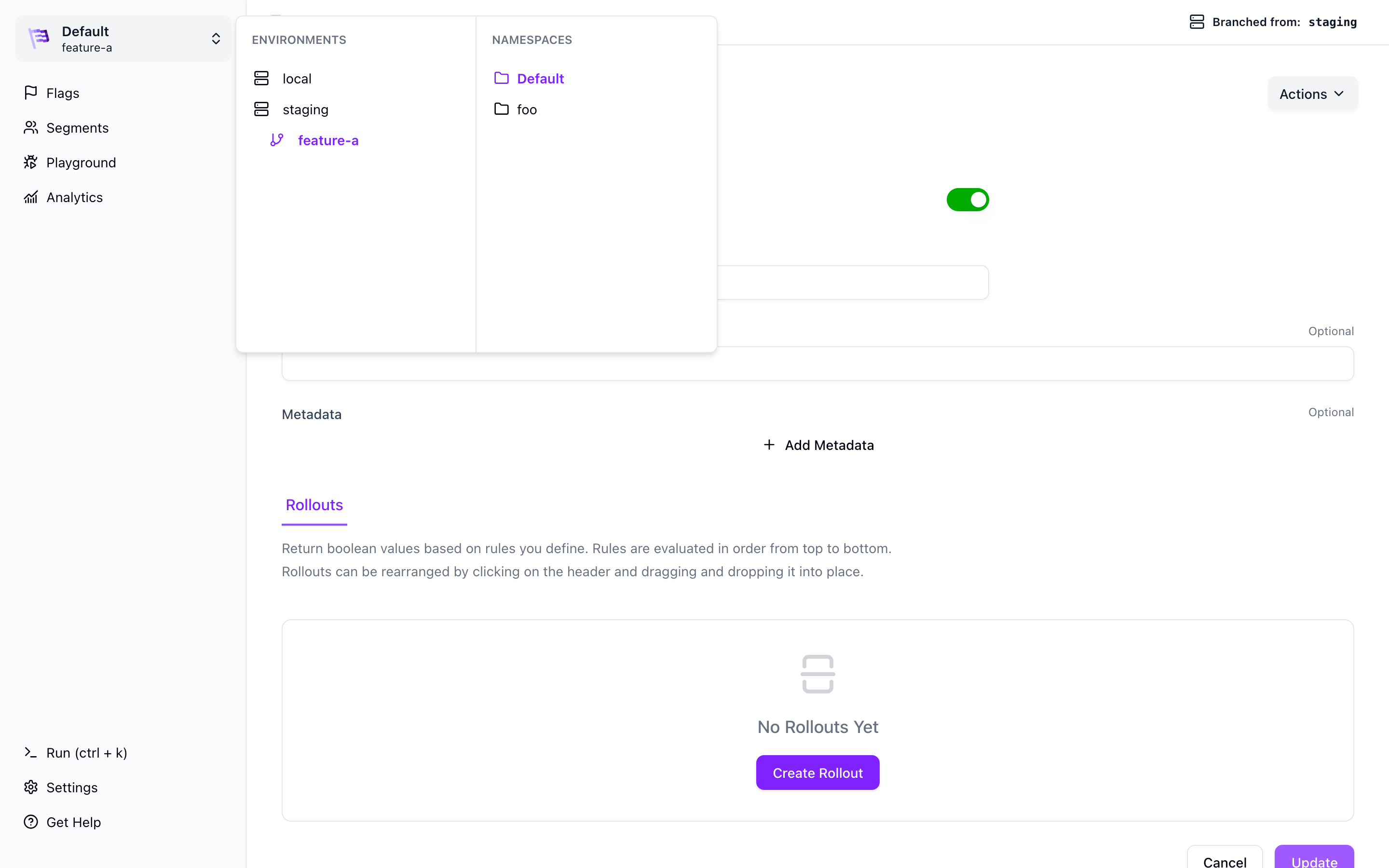 You can create as many branches as you want from a base environment, however
you cannot branch from a branch.
## Namespaces
Namespaces are a way to organize your feature flags and configurations within an environment.
One common use-case of Namespaces is to separate Flipt data by internal team.
All data created in one namespace is only accessible within that namespace, meaning flags, segments, etc must be created in each namespace in which they're to be used.
If a namespace isn't selected then the 'Default' namespace is used.
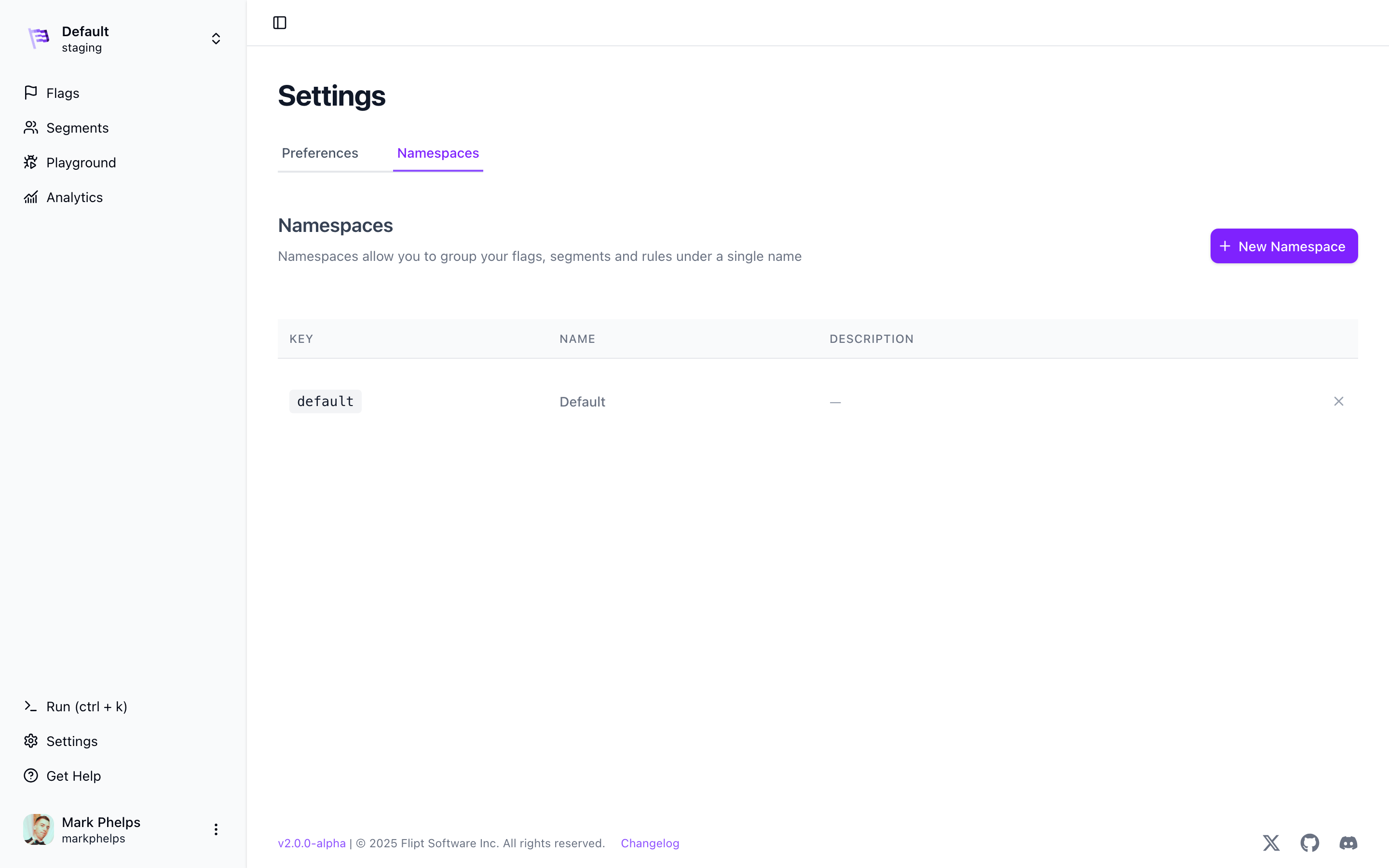
Namespaces can be managed within the `Settings` section of the Flipt UI:
You can create as many branches as you want from a base environment, however
you cannot branch from a branch.
## Namespaces
Namespaces are a way to organize your feature flags and configurations within an environment.
One common use-case of Namespaces is to separate Flipt data by internal team.
All data created in one namespace is only accessible within that namespace, meaning flags, segments, etc must be created in each namespace in which they're to be used.
If a namespace isn't selected then the 'Default' namespace is used.
Namespaces can be managed within the `Settings` section of the Flipt UI:
 ## Flags
Flags are the basic unit in the Flipt ecosystem. Flags represent experiments or
features that you want to be able to enable or disable for users of your
applications.
For example, a flag named `New Contact Page` could be used to determine whether
or not a given user sees the latest version of a 'Contact Us' page that you are
working on when they visit your homepage.
Flags can be used as simple on/off toggles or with variants and rules to support
more elaborate use cases.
## Flags
Flags are the basic unit in the Flipt ecosystem. Flags represent experiments or
features that you want to be able to enable or disable for users of your
applications.
For example, a flag named `New Contact Page` could be used to determine whether
or not a given user sees the latest version of a 'Contact Us' page that you are
working on when they visit your homepage.
Flags can be used as simple on/off toggles or with variants and rules to support
more elaborate use cases.
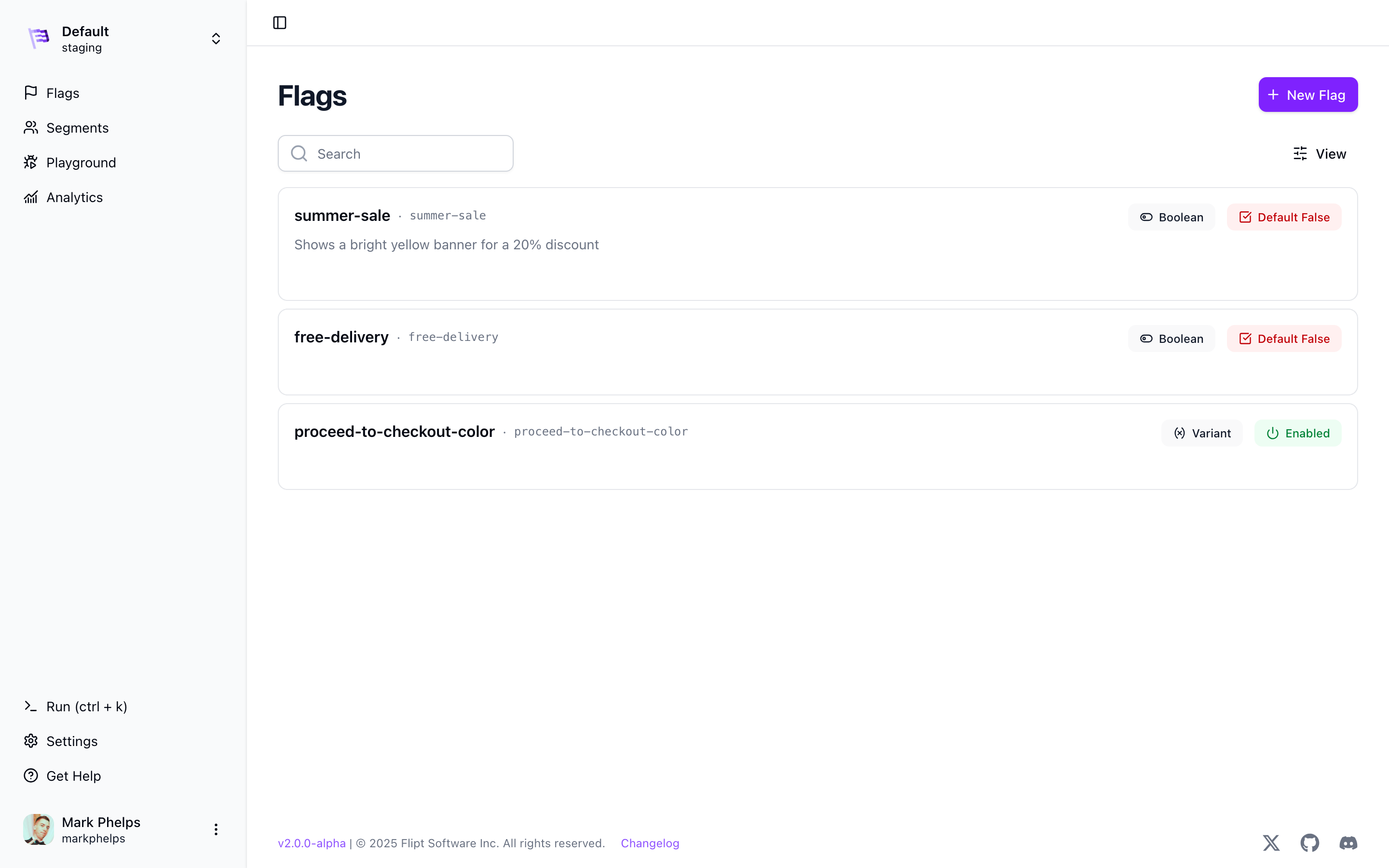 There are two types of flags:
* **Variant** which allows you to return a single variant for a given flag given a set of evaluation rules. This is the default flag type.
* **Boolean** which allows you to return a boolean value for a given flag.
### Variant Flags
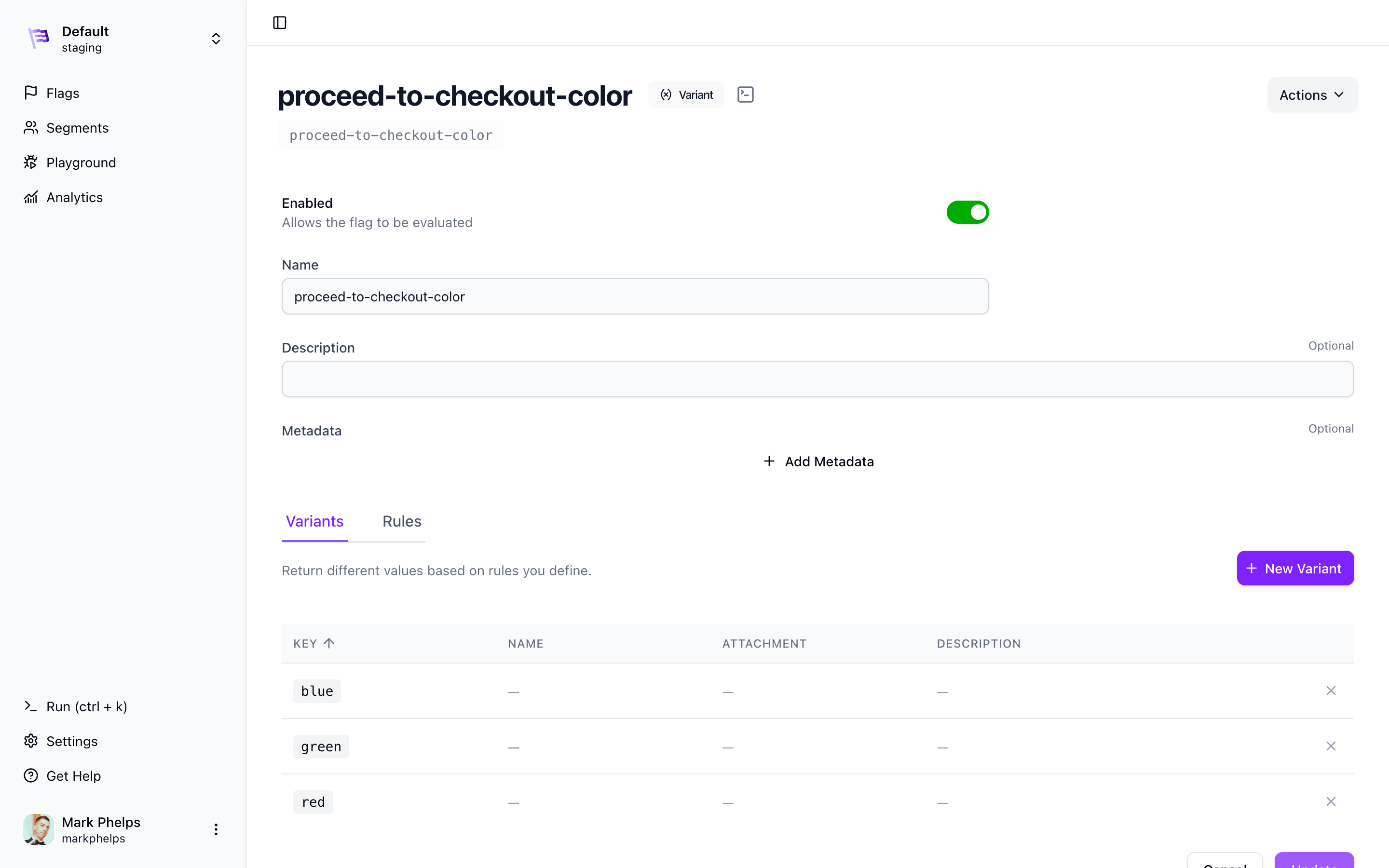
Variants are options for flags. For example, if you have a flag `Proceed to Checkout Color`
that determines which color your users see when they proceed to checkout, then possible variants could include `blue`, `red` or `green`.
There are two types of flags:
* **Variant** which allows you to return a single variant for a given flag given a set of evaluation rules. This is the default flag type.
* **Boolean** which allows you to return a boolean value for a given flag.
### Variant Flags
Variants are options for flags. For example, if you have a flag `Proceed to Checkout Color`
that determines which color your users see when they proceed to checkout, then possible variants could include `blue`, `red` or `green`.
 #### Variant Attachments
Variants can also have JSON attachments. This allows you to store additional
data about a variant that can be used in your application at runtime.
Variant attachments are not used for evaluation, they are only used for runtime configuration.
The attachment size is limited to **1MB**.
### Boolean Flags
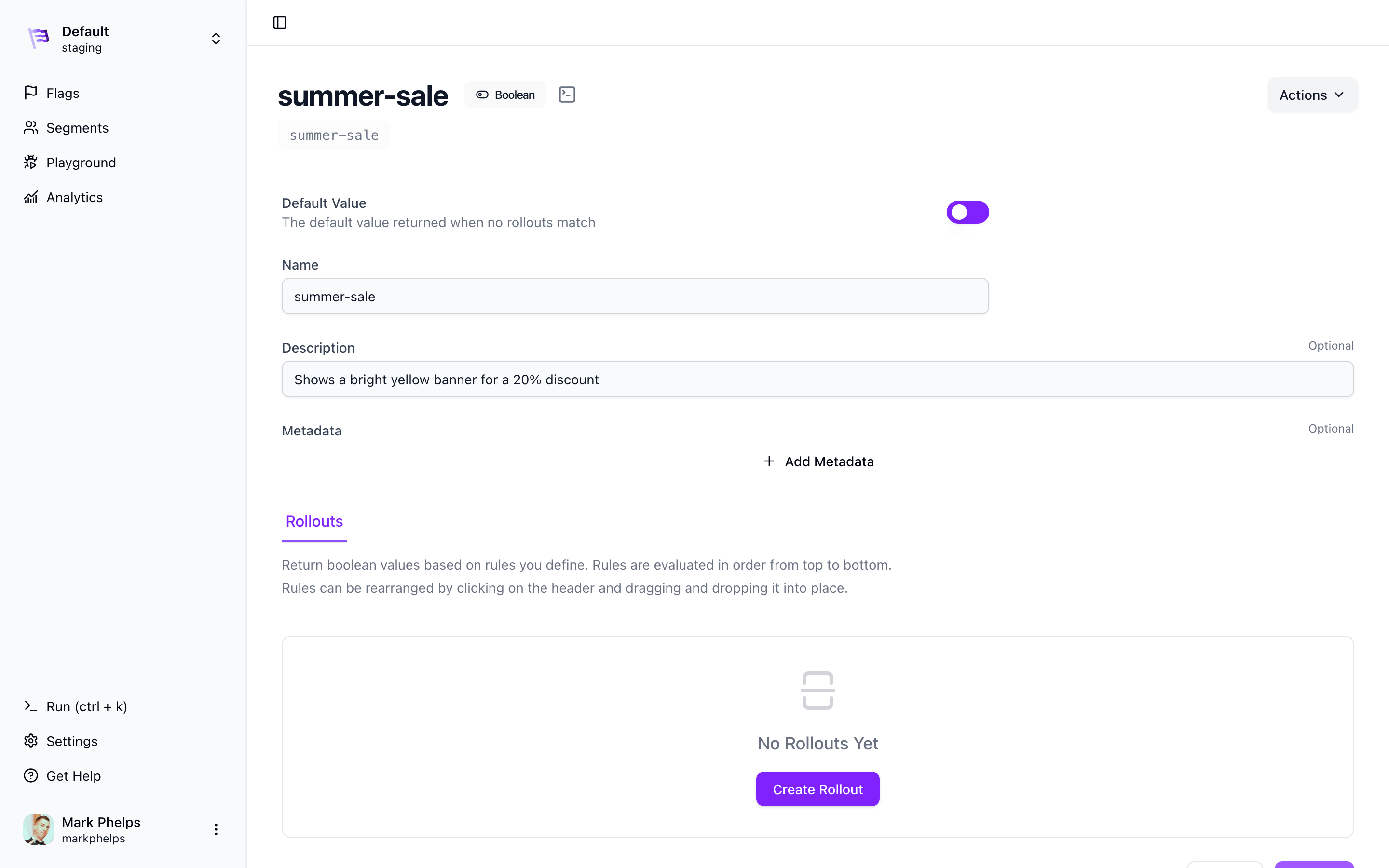
Boolean flags are a special type of flag that allow you to return a boolean value for a given flag.
You can use boolean flags to determine if a feature is enabled or disabled for a given entity (user, device, etc) by returning `true` or `false` respectively. Boolean flags work well for simple use cases where you don't need to return multiple variants.
Boolean flags can be configured with [rollout](#rollouts) rules to determine which entities receive `true` or `false` for a given flag.
#### Variant Attachments
Variants can also have JSON attachments. This allows you to store additional
data about a variant that can be used in your application at runtime.
Variant attachments are not used for evaluation, they are only used for runtime configuration.
The attachment size is limited to **1MB**.
### Boolean Flags
Boolean flags are a special type of flag that allow you to return a boolean value for a given flag.
You can use boolean flags to determine if a feature is enabled or disabled for a given entity (user, device, etc) by returning `true` or `false` respectively. Boolean flags work well for simple use cases where you don't need to return multiple variants.
Boolean flags can be configured with [rollout](#rollouts) rules to determine which entities receive `true` or `false` for a given flag.
 ### Metadata
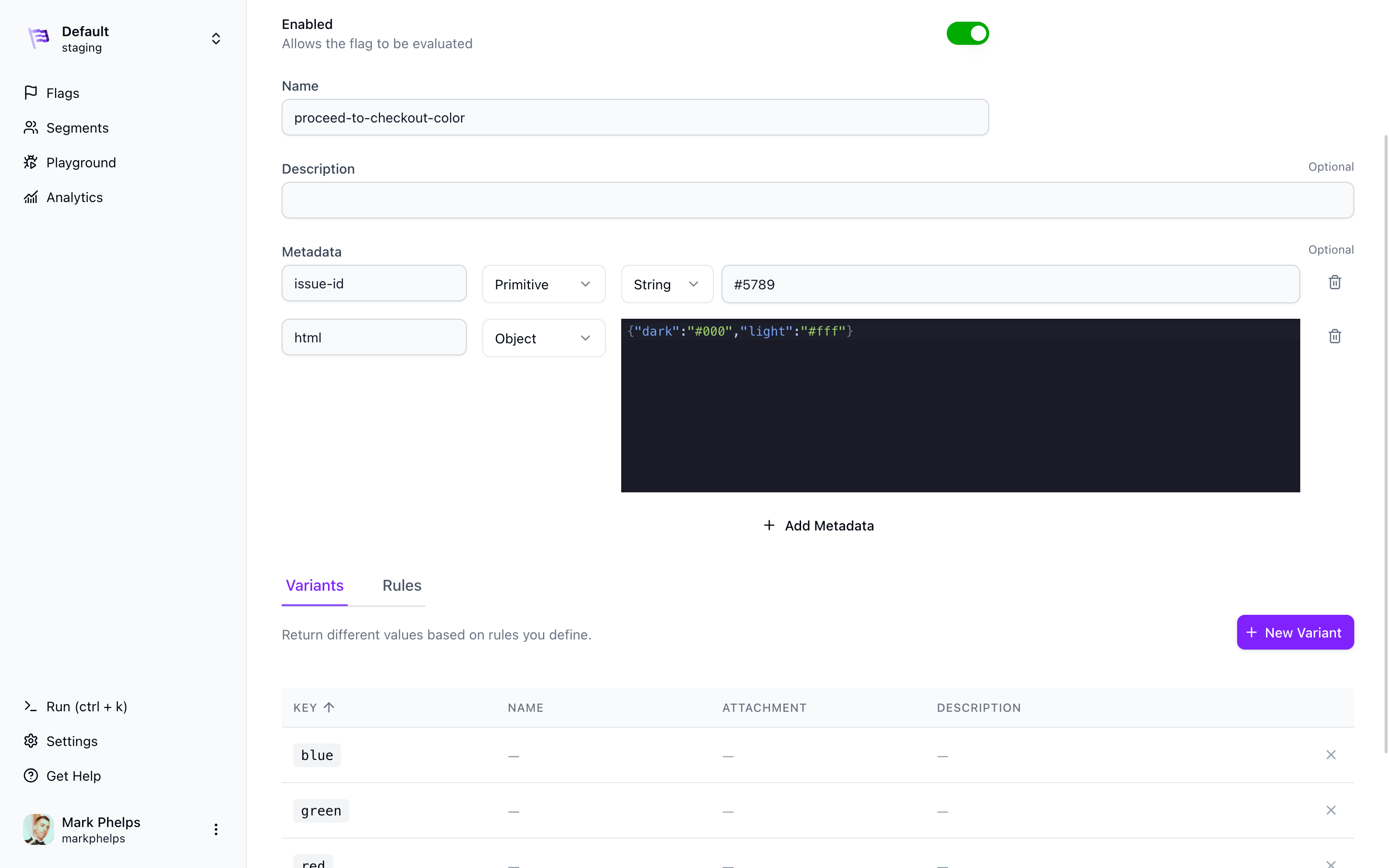
All flags can have metadata associated with them. This metadata is stored in the Flipt backend and can be used to add additional information about a flag.
Metadata is stored as a JSON object and is not used for evaluation. You can retrieve flag metadata using the [Get Flag](/v1/reference/flags/get-flag) API.
By default, ListFlags responses omit flag metadata. To include metadata in ListFlags responses, set [`evaluation.include_flag_metadata`](/v2/configuration/overview#evaluation) to `true`.
In the Flipt UI, metadata is displayed in the flag details section. The UI allows you to add, edit, and delete metadata and provides a more user-friendly interface for managing metadata by specifying key-value pairs and their data types.
Currently, the following data types are supported:
* Primitive types: `String`, `Number`, `Boolean`
* Complex types: `Array`, `Object`
### Metadata
All flags can have metadata associated with them. This metadata is stored in the Flipt backend and can be used to add additional information about a flag.
Metadata is stored as a JSON object and is not used for evaluation. You can retrieve flag metadata using the [Get Flag](/v1/reference/flags/get-flag) API.
By default, ListFlags responses omit flag metadata. To include metadata in ListFlags responses, set [`evaluation.include_flag_metadata`](/v2/configuration/overview#evaluation) to `true`.
In the Flipt UI, metadata is displayed in the flag details section. The UI allows you to add, edit, and delete metadata and provides a more user-friendly interface for managing metadata by specifying key-value pairs and their data types.
Currently, the following data types are supported:
* Primitive types: `String`, `Number`, `Boolean`
* Complex types: `Array`, `Object`
 ## Segments
Segments allow you to split your user base or audience up into predefined
slices. This is a powerful feature that enables targeting groups to determine if
a flag or variant applies to them.
An example segment could be `beta-users`.
## Segments
Segments allow you to split your user base or audience up into predefined
slices. This is a powerful feature that enables targeting groups to determine if
a flag or variant applies to them.
An example segment could be `beta-users`.
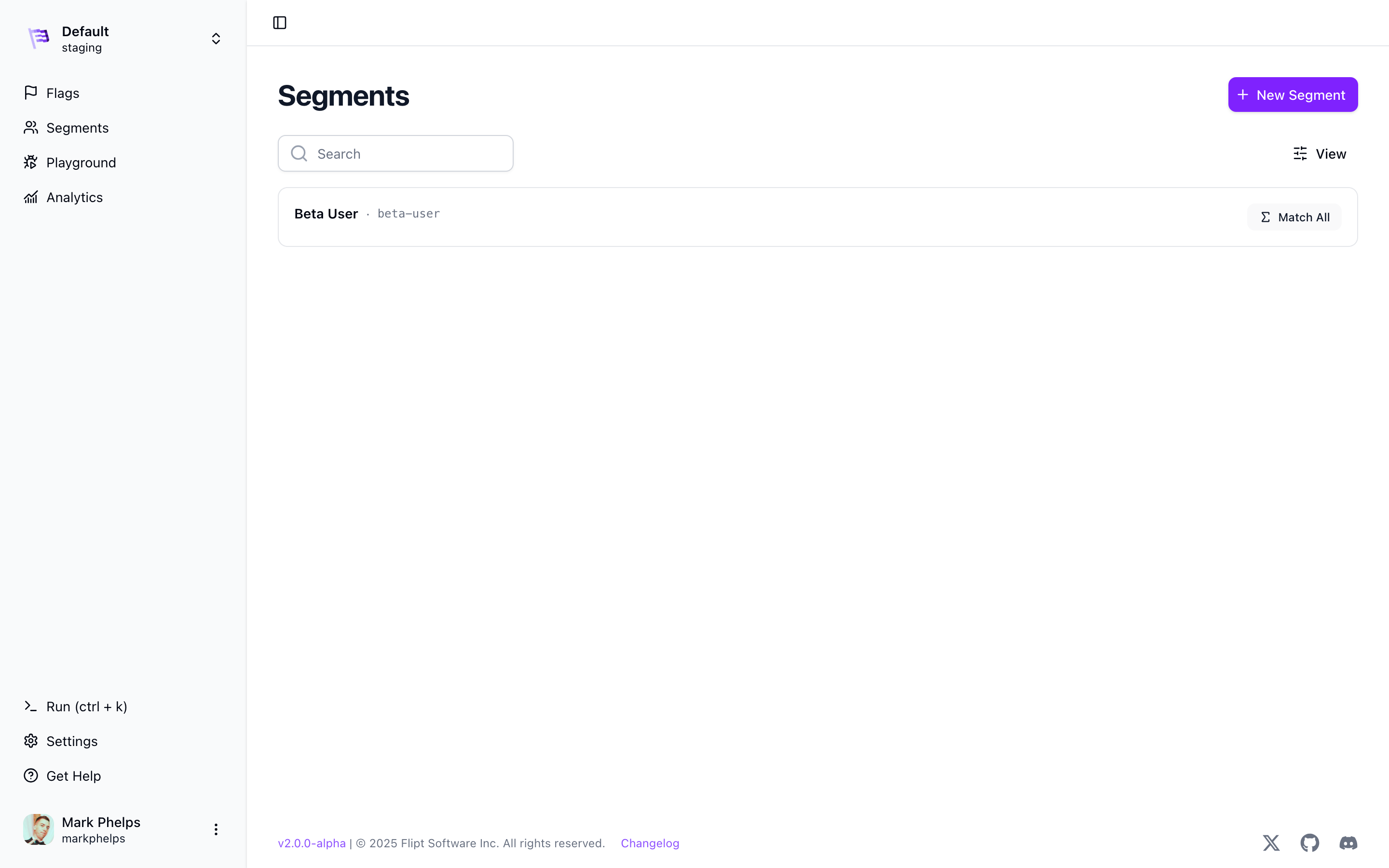 Segments are global within a Flipt namespace.
### Match Types
When configuring a segment you can choose a `Match Type` of either:
* **Match All** which requires ALL constraints to match for the segment to apply
for evaluation.
* **Match Any** which requires AT LEAST ONE constraint to match for the segment
to apply for evaluation.
### Constraints
Constraints allow you to determine which segment a given entity is a part of.
For example, for a user to fall into the above `beta-users` segment, you may want
to check their `finished_onboarding` property.
Segments are global within a Flipt namespace.
### Match Types
When configuring a segment you can choose a `Match Type` of either:
* **Match All** which requires ALL constraints to match for the segment to apply
for evaluation.
* **Match Any** which requires AT LEAST ONE constraint to match for the segment
to apply for evaluation.
### Constraints
Constraints allow you to determine which segment a given entity is a part of.
For example, for a user to fall into the above `beta-users` segment, you may want
to check their `finished_onboarding` property.
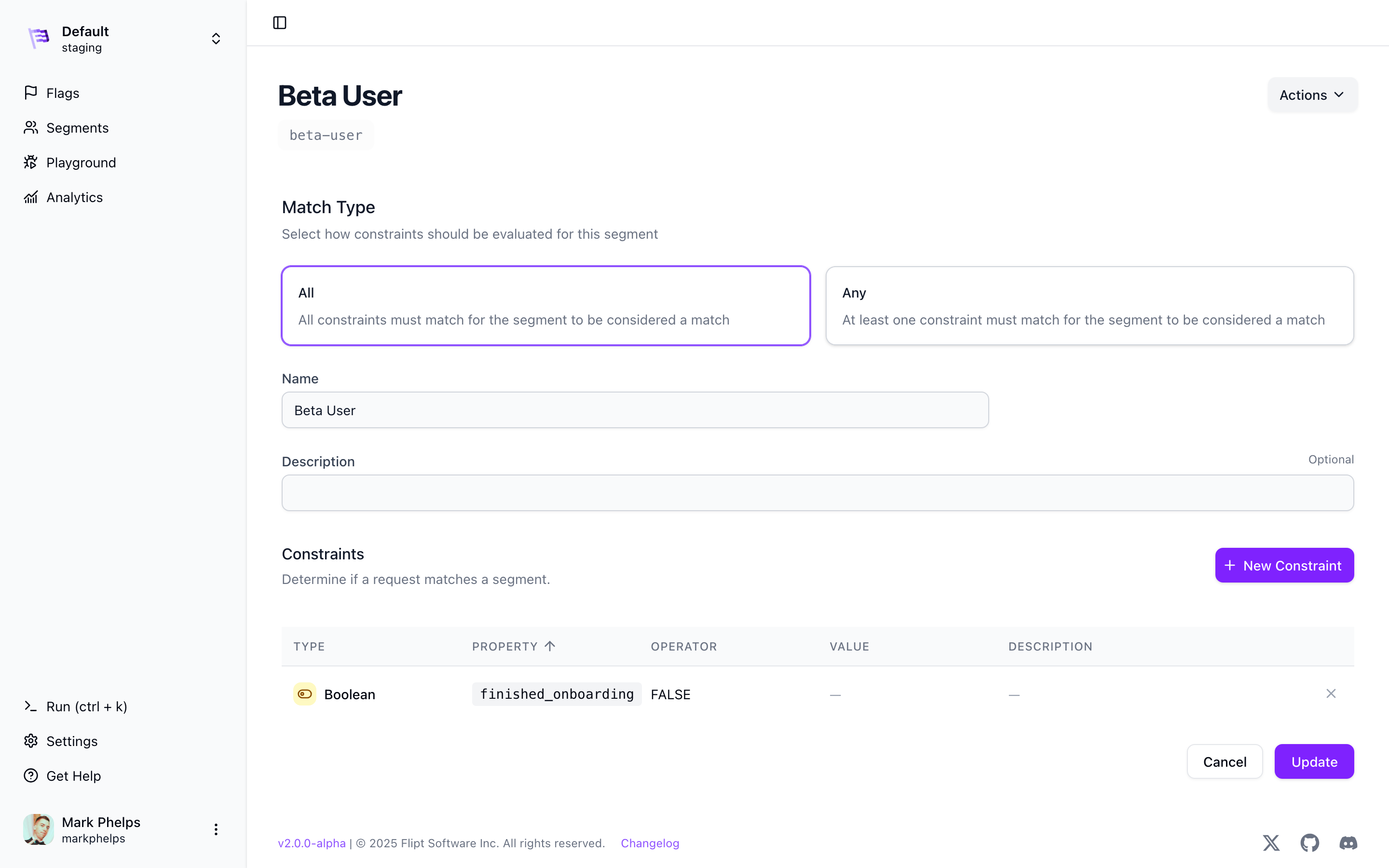 All constraints have a *property*, *type*, *operator* and optionally a *value*.
#### Constraint Types
Currently 5 constraint types are available:
* **String** which allows you to check a string property of an entity
* **Number** which allows you to check a number property of an entity (integer or float)
* **Boolean** which allows you to check a boolean property of an entity such as `true` or `false`
* **DateTime** which allows you to check a date or datetime property of an entity such as `2020-01-01` or `2020-01-01T00:00:00Z` ([RFC3339](https://datatracker.ietf.org/doc/html/rfc3339))
* **Entity** which allows you to check the `entityId` that was sent in the body of the `Variant` or `Boolean` request
The constraint value is represented as a string in transit and in storage,
however it's coerced into the appropriate type for evaluation.
## Rules
Rules allow you to tie your flags, variants and segments together by specifying
which segments are targeted by which variants.
Rules can be as simple as `IF IN segment THEN RETURN variant_a` or they can be
richer by using distribution logic to roll out features on a percentage basis.
Continuing our previous example, we may want to return the flag variant `green`
for all entities in the `beta-users` segment. This would be configured like so:
All constraints have a *property*, *type*, *operator* and optionally a *value*.
#### Constraint Types
Currently 5 constraint types are available:
* **String** which allows you to check a string property of an entity
* **Number** which allows you to check a number property of an entity (integer or float)
* **Boolean** which allows you to check a boolean property of an entity such as `true` or `false`
* **DateTime** which allows you to check a date or datetime property of an entity such as `2020-01-01` or `2020-01-01T00:00:00Z` ([RFC3339](https://datatracker.ietf.org/doc/html/rfc3339))
* **Entity** which allows you to check the `entityId` that was sent in the body of the `Variant` or `Boolean` request
The constraint value is represented as a string in transit and in storage,
however it's coerced into the appropriate type for evaluation.
## Rules
Rules allow you to tie your flags, variants and segments together by specifying
which segments are targeted by which variants.
Rules can be as simple as `IF IN segment THEN RETURN variant_a` or they can be
richer by using distribution logic to roll out features on a percentage basis.
Continuing our previous example, we may want to return the flag variant `green`
for all entities in the `beta-users` segment. This would be configured like so:
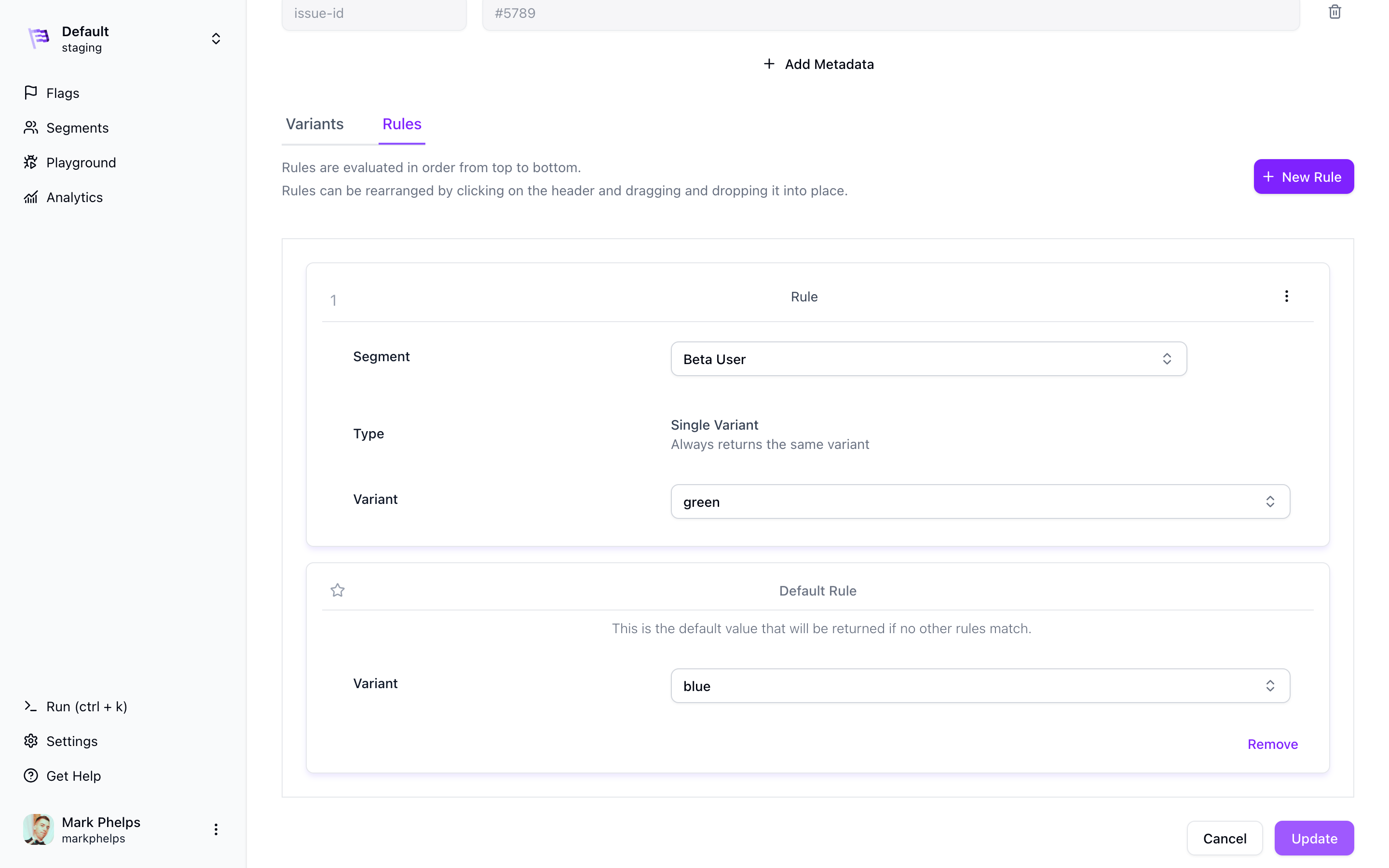 Rules are evaluated in order per their rank from 1-N. The first rule that
matches wins. Once created, rules can be re-ordered to change how they're
evaluated.
### Default Rule
If no rules match for a given flag, the default rule value is returned. This value is optional and can be set to any variant that exists for the flag.
### Distributions
Distributions allow you to return different variants of your flag to different
percentages of your user base based on your rules.
Let's say that instead of always showing the `green` variant to your `beta-users`
segment, you want to show `green` to **10%** of `beta-users`, `blue` to **30%**, and `red`
to the remaining **60%**. You would accomplish this using rules with distributions:
Rules are evaluated in order per their rank from 1-N. The first rule that
matches wins. Once created, rules can be re-ordered to change how they're
evaluated.
### Default Rule
If no rules match for a given flag, the default rule value is returned. This value is optional and can be set to any variant that exists for the flag.
### Distributions
Distributions allow you to return different variants of your flag to different
percentages of your user base based on your rules.
Let's say that instead of always showing the `green` variant to your `beta-users`
segment, you want to show `green` to **10%** of `beta-users`, `blue` to **30%**, and `red`
to the remaining **60%**. You would accomplish this using rules with distributions:
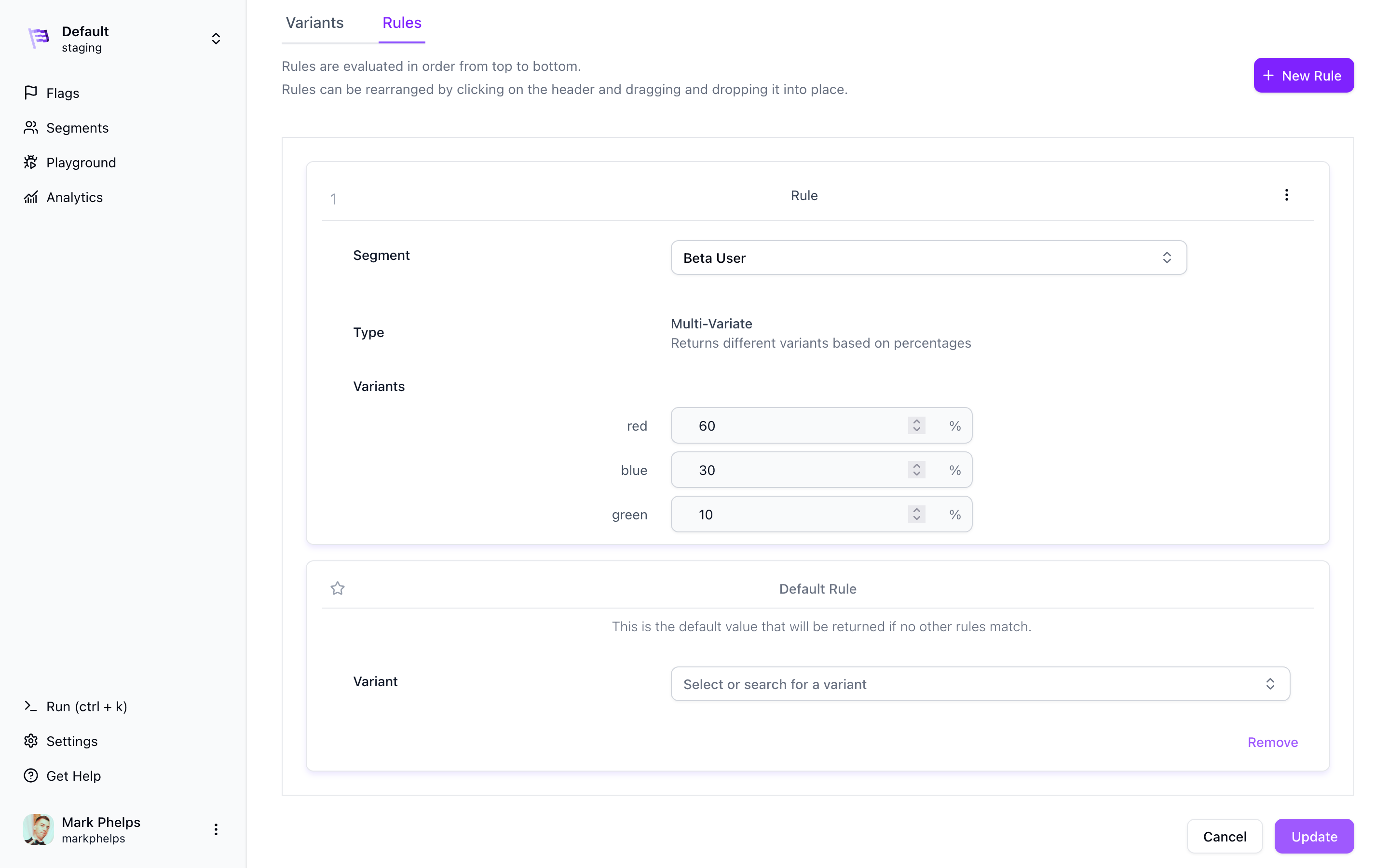 The ability to manage distributions, as illustrated in the image above, is an extremely powerful feature of Flipt that can help you seamlessly deploy new features of your applications to your users while also limiting the reach of potential bugs.
## Rollouts
Rollouts allow you to potentially change the result of a boolean flag value at request time.
Rollouts are a sequence of conditions which when one is matched for a request context, overrides the default rollout property.
Current rollout types include:
* **Threshold** which allows you to return `true` or `false` for a given percentage of entities.
* **Segments Match** which allows you to return `true` or `false` if an entity matches a given segment.
The ability to manage distributions, as illustrated in the image above, is an extremely powerful feature of Flipt that can help you seamlessly deploy new features of your applications to your users while also limiting the reach of potential bugs.
## Rollouts
Rollouts allow you to potentially change the result of a boolean flag value at request time.
Rollouts are a sequence of conditions which when one is matched for a request context, overrides the default rollout property.
Current rollout types include:
* **Threshold** which allows you to return `true` or `false` for a given percentage of entities.
* **Segments Match** which allows you to return `true` or `false` if an entity matches a given segment.
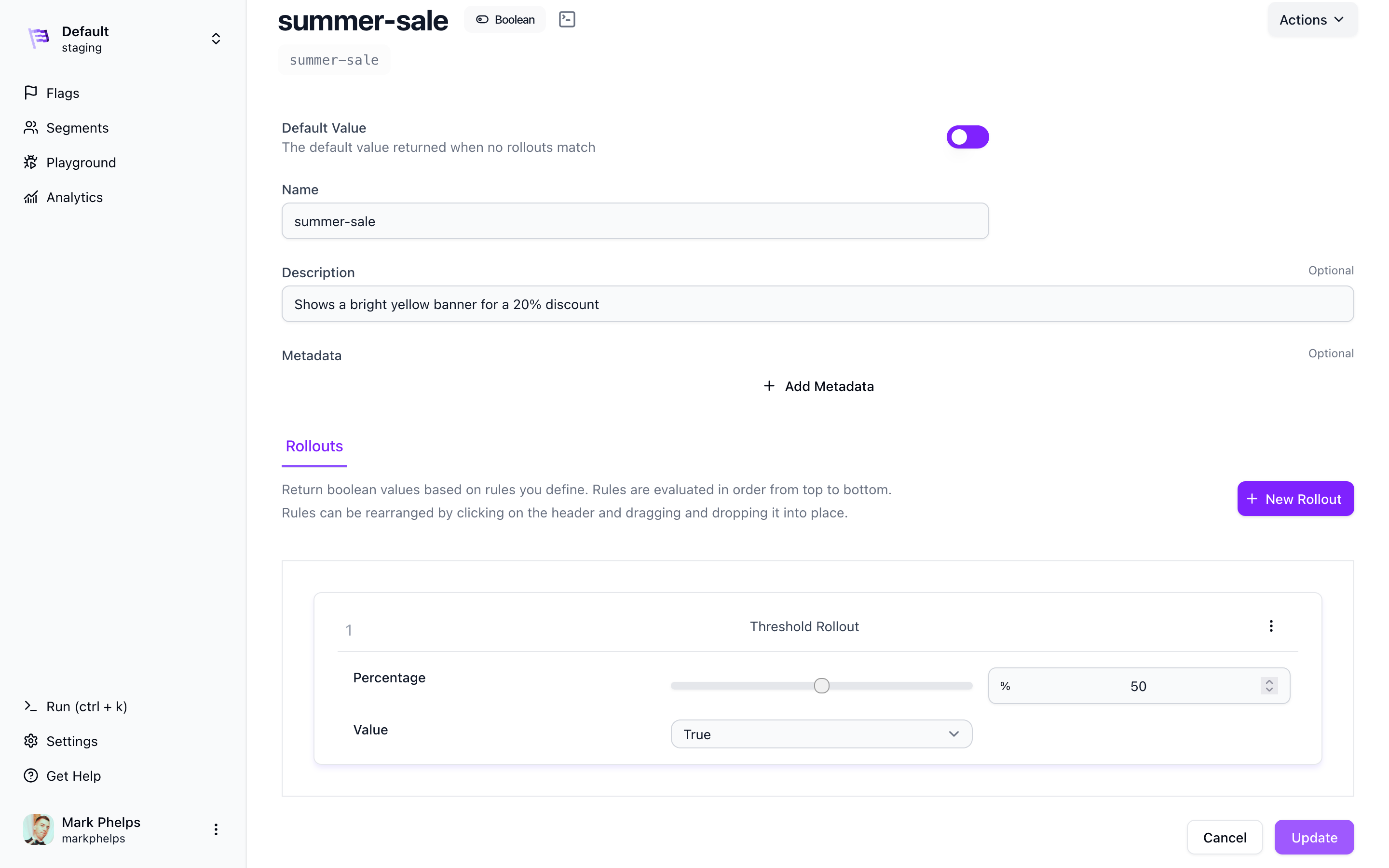 Rollouts work similar to [Rules](#rules) in that they're evaluated in order per their rank from 1-N. The first rollout that matches wins. Once created, rollouts can be re-ordered to change how they're evaluated.
### Default Rollout
If no rollouts match for a given flag, the default rollout value is returned. This value is the same as the 'enabled' value for the flag for backward compatibility reasons.
## Evaluation
Evaluation is the process of sending requests to the Flipt server to process and
determine if that request matches any of your segments and if so which variant or boolean value
to return depending on flag type.
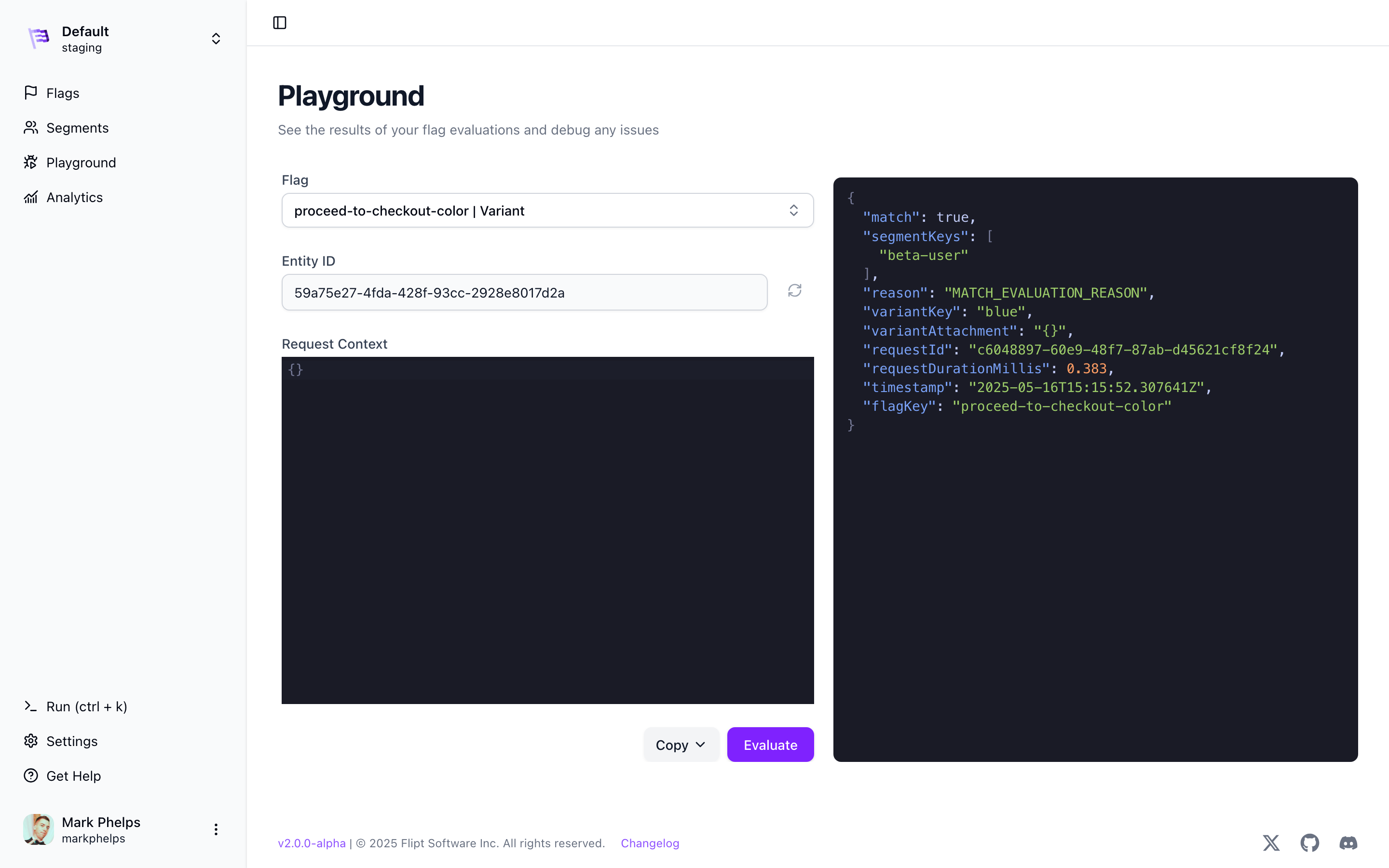
In the above example involving checkout colors, evaluation is where you send information
about your current user to determine if they're a `beta-user`, and which color
(`green`, `blue`, or `red`) that they should see for their checkout color.
Rollouts work similar to [Rules](#rules) in that they're evaluated in order per their rank from 1-N. The first rollout that matches wins. Once created, rollouts can be re-ordered to change how they're evaluated.
### Default Rollout
If no rollouts match for a given flag, the default rollout value is returned. This value is the same as the 'enabled' value for the flag for backward compatibility reasons.
## Evaluation
Evaluation is the process of sending requests to the Flipt server to process and
determine if that request matches any of your segments and if so which variant or boolean value
to return depending on flag type.
In the above example involving checkout colors, evaluation is where you send information
about your current user to determine if they're a `beta-user`, and which color
(`green`, `blue`, or `red`) that they should see for their checkout color.
 ### Entities
Evaluation works by uniquely identifying each *thing* that you want to compare
against your segments and flags. We call this an `entity` in the Flipt
ecosystem. More often than not this will be a user, but we didn't want to make
any assumptions about how your application works, which is why `entity` was chosen.
**Entity**
What you want to test against in your application
For Flipt to successfully determine which *bucket* your entities fall into, it
must have a way to uniquely identify them. This is the `entityId` and it's a
simple string. It's up to you what that `entityId` is.
It could be a:
* email address
* userID
* IP address
* physical address
* etc
Anything that's unique enough for your application and its requirements.
### Context
The final piece of the puzzle is context. Context allows Flipt to determine
which segment your entity falls into by comparing it to all the possible
constraints that you defined.
**Context**
Metadata associated with your entity used to determine which if any segments
that entity is a member of
Examples of context include:
```
- isAdmin
- favoriteColor
- country
- freeUser
```
Think of these as pieces of information that are usually not unique, but that
can be used to split your entities into your segments.
You can include as much or as little context for each entity as you want,
however, the more context that you provide, the more likely it's that an entity
will match one of your segments.
In Flipt, `context` is a simple map of key-value pairs where the key is the
property to match against all constraints, and the value is what's compared.
### Bucketing
Bucketing is the process of determining which variant to return for a given evaluation request.
Flipt uses a hashing algorithm to determine which variant to return for a given `flagKey`, `entityID` and `context`. This is what allows Flipt to return the same variant every time (also sometimes referred to as **stickiness**).
Flipt never persists any information about your entities or context or which
variant was returned for a given evaluation request. This is all done at
runtime and is ephemeral.
This allows Flipt to be used in a wide variety of
applications and use cases without having to worry about inadvertently storing
personally identifiable information (PII) or other privacy concerns.
**Let's look at how it works:**
1. Flipt takes the `flagKey` and `entityID` and concatenates them together to
form a string that looks like `flagKey:entityID`. This is called the key.
2. Flipt then takes this new key and uses a hashing algorithm ([CRC-32 ChecksumIEEE](https://pkg.go.dev/hash/crc32#ChecksumIEEE)) to create a 32-bit integer called the hash.
3. Flipt then creates a set of buckets from 0‐999 (1000 total buckets), mapping them with a sorted set of the [distributions](#distributions) for the flag.
4. Finally, Flipt takes the hash and uses the modulo operator to determine which bucket the hashed value falls into. The distribution that maps to that bucket is then returned.
**Consider an example:**
Imagine that you have a flag with two [distributions](#distributions) `A` and `B`.
If `distribution A` has a 30% 'rollout', then it would 'take up' buckets 0‐299 (out of the 1000 buckets). `Distribution B` would take up the remaining buckets 300‐999.
The `flagKey/entityID` hashed value is a 32bit integer on which Flipt performs a [modulo](https://en.wikipedia.org/wiki/Modulo) operation (% 1000) so that it 's guaranteed to return a number between 0‐999.
The result of the modulo operation is then used to determine which distribution to return via the bucket mapping. If the result is between 0‐299, then `distribution A` is returned, otherwise `distribution B` is returned.
### Entities
Evaluation works by uniquely identifying each *thing* that you want to compare
against your segments and flags. We call this an `entity` in the Flipt
ecosystem. More often than not this will be a user, but we didn't want to make
any assumptions about how your application works, which is why `entity` was chosen.
**Entity**
What you want to test against in your application
For Flipt to successfully determine which *bucket* your entities fall into, it
must have a way to uniquely identify them. This is the `entityId` and it's a
simple string. It's up to you what that `entityId` is.
It could be a:
* email address
* userID
* IP address
* physical address
* etc
Anything that's unique enough for your application and its requirements.
### Context
The final piece of the puzzle is context. Context allows Flipt to determine
which segment your entity falls into by comparing it to all the possible
constraints that you defined.
**Context**
Metadata associated with your entity used to determine which if any segments
that entity is a member of
Examples of context include:
```
- isAdmin
- favoriteColor
- country
- freeUser
```
Think of these as pieces of information that are usually not unique, but that
can be used to split your entities into your segments.
You can include as much or as little context for each entity as you want,
however, the more context that you provide, the more likely it's that an entity
will match one of your segments.
In Flipt, `context` is a simple map of key-value pairs where the key is the
property to match against all constraints, and the value is what's compared.
### Bucketing
Bucketing is the process of determining which variant to return for a given evaluation request.
Flipt uses a hashing algorithm to determine which variant to return for a given `flagKey`, `entityID` and `context`. This is what allows Flipt to return the same variant every time (also sometimes referred to as **stickiness**).
Flipt never persists any information about your entities or context or which
variant was returned for a given evaluation request. This is all done at
runtime and is ephemeral.
This allows Flipt to be used in a wide variety of
applications and use cases without having to worry about inadvertently storing
personally identifiable information (PII) or other privacy concerns.
**Let's look at how it works:**
1. Flipt takes the `flagKey` and `entityID` and concatenates them together to
form a string that looks like `flagKey:entityID`. This is called the key.
2. Flipt then takes this new key and uses a hashing algorithm ([CRC-32 ChecksumIEEE](https://pkg.go.dev/hash/crc32#ChecksumIEEE)) to create a 32-bit integer called the hash.
3. Flipt then creates a set of buckets from 0‐999 (1000 total buckets), mapping them with a sorted set of the [distributions](#distributions) for the flag.
4. Finally, Flipt takes the hash and uses the modulo operator to determine which bucket the hashed value falls into. The distribution that maps to that bucket is then returned.
**Consider an example:**
Imagine that you have a flag with two [distributions](#distributions) `A` and `B`.
If `distribution A` has a 30% 'rollout', then it would 'take up' buckets 0‐299 (out of the 1000 buckets). `Distribution B` would take up the remaining buckets 300‐999.
The `flagKey/entityID` hashed value is a 32bit integer on which Flipt performs a [modulo](https://en.wikipedia.org/wiki/Modulo) operation (% 1000) so that it 's guaranteed to return a number between 0‐999.
The result of the modulo operation is then used to determine which distribution to return via the bucket mapping. If the result is between 0‐299, then `distribution A` is returned, otherwise `distribution B` is returned.