> ## Documentation Index
> Fetch the complete documentation index at: https://docs.flipt.io/llms.txt
> Use this file to discover all available pages before exploring further.
# Model Context Protocol (MCP)
> Use Flipt's MCP server to enable AI assistants to interact with your feature flags
## Overview
The [Model Context Protocol (MCP)](https://modelcontextprotocol.io/) is an open protocol that standardizes how applications provide context to Large Language Models (LLMs). Think of MCP like a USB-C port for AI applications - it provides a standardized way to connect AI models to different data sources and tools.
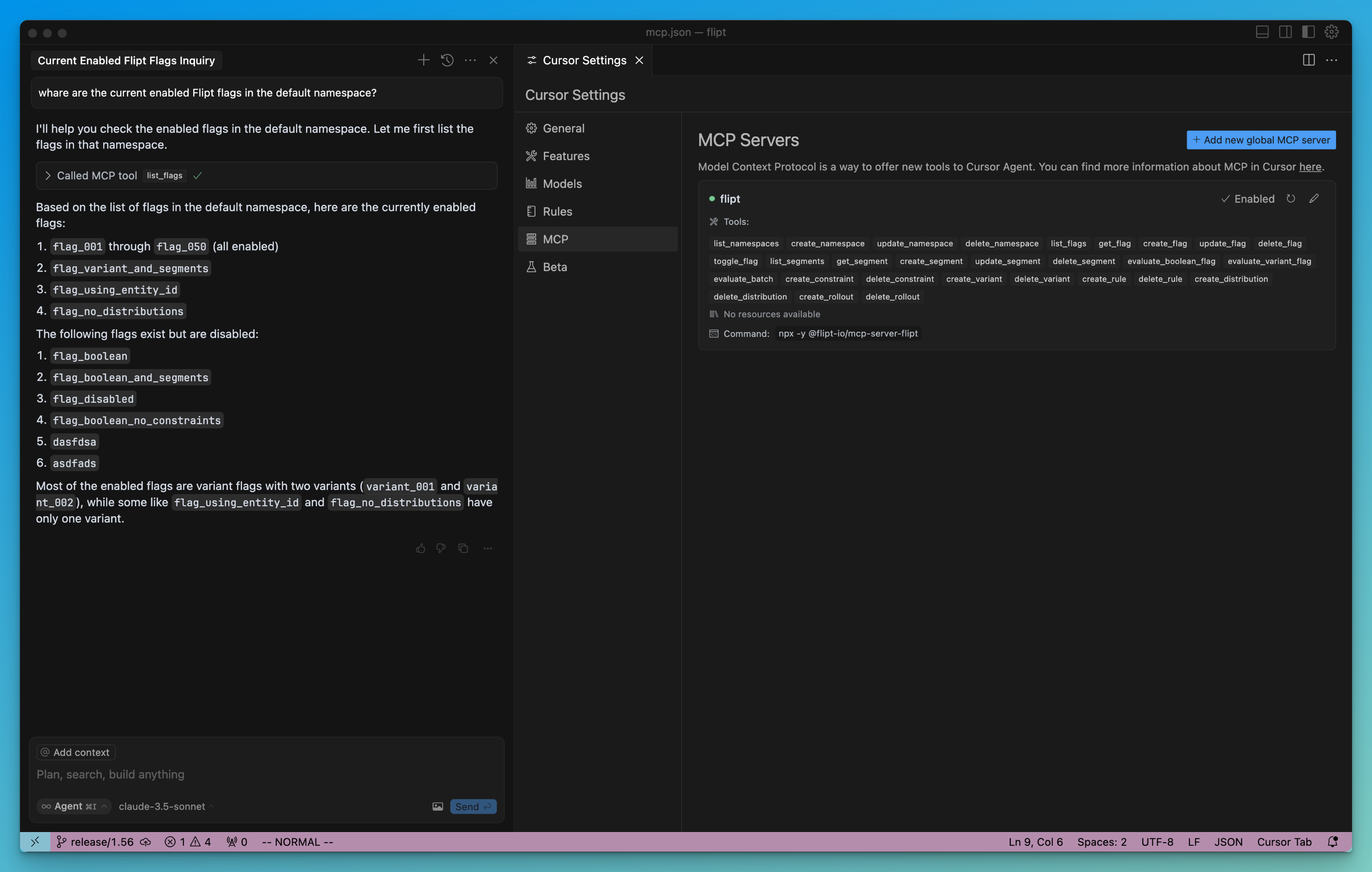
[Flipt's MCP server](https://github.com/flipt-io/mcp-server-flipt) allows AI assistants and LLMs to directly interact with your feature flags, segments, and evaluations through a standardized interface. This enables powerful AI-driven workflows and integrations with tools that support the MCP protocol.
 ## Use Cases
### AI-Enabled IDEs
When using AI-enabled IDEs like Cursor that support MCP, your AI assistant can:
* Check feature flag states while reviewing code
* Help toggle features on/off during development
* Assist in creating and managing feature flags
* Evaluate flags for specific users/entities
* Help debug feature flag logic and rules
For example, you could ask your AI assistant:
* "What's the current state of the 'dark-mode' flag?"
* "Enable the 'beta-features' flag for all users in the 'internal' segment"
* "Create a new feature flag for our upcoming notification system"
### AI Agents and Workflows
The Flipt MCP server can be integrated into broader AI agent workflows to:
* Automate feature flag management based on system metrics
* Coordinate feature rollouts across multiple services
* Generate reports on feature usage and impact
* Manage complex feature flag rules and segments
## Getting Started
Check out the [Flipt MCP server repository](https://github.com/flipt-io/mcp-server-flipt) for the most up to date information on how to use the MCP server.
### Cursor
To use the Flipt MCP server with Cursor, you need to configure Cursor to use the MCP server.
The Cursor docs have a [guide on how to configure Cursor](https://docs.cursor.com/context/model-context-protocol#configuring-mcp-servers) to use a MCP server.
For Flipt, you can use the following configuration:
```json theme={null}
{
"mcpServers": {
"flipt": {
"command": "npx",
"args": ["-y", "@flipt-io/mcp-server-flipt"]
}
}
}
```
### Configuration
The server can be configured using environment variables:
```bash theme={null}
# The URL of your Flipt instance
FLIPT_API_URL=http://localhost:8080
# Optional API key for authentication
FLIPT_API_KEY=
```
## Available Operations
The Flipt MCP server provides tools for:
* **Namespace Management**: Create, list, update, and delete namespaces
* **Flag Operations**: Create, toggle, and manage feature flags
* **Segment Management**: Define and update user segments
* **Flag Evaluation**: Evaluate flags for specific entities
* **Constraints & Rules**: Manage targeting rules and constraints
* **Variants & Distributions**: Configure feature variants and rollout distributions
## Use Cases
### AI-Enabled IDEs
When using AI-enabled IDEs like Cursor that support MCP, your AI assistant can:
* Check feature flag states while reviewing code
* Help toggle features on/off during development
* Assist in creating and managing feature flags
* Evaluate flags for specific users/entities
* Help debug feature flag logic and rules
For example, you could ask your AI assistant:
* "What's the current state of the 'dark-mode' flag?"
* "Enable the 'beta-features' flag for all users in the 'internal' segment"
* "Create a new feature flag for our upcoming notification system"
### AI Agents and Workflows
The Flipt MCP server can be integrated into broader AI agent workflows to:
* Automate feature flag management based on system metrics
* Coordinate feature rollouts across multiple services
* Generate reports on feature usage and impact
* Manage complex feature flag rules and segments
## Getting Started
Check out the [Flipt MCP server repository](https://github.com/flipt-io/mcp-server-flipt) for the most up to date information on how to use the MCP server.
### Cursor
To use the Flipt MCP server with Cursor, you need to configure Cursor to use the MCP server.
The Cursor docs have a [guide on how to configure Cursor](https://docs.cursor.com/context/model-context-protocol#configuring-mcp-servers) to use a MCP server.
For Flipt, you can use the following configuration:
```json theme={null}
{
"mcpServers": {
"flipt": {
"command": "npx",
"args": ["-y", "@flipt-io/mcp-server-flipt"]
}
}
}
```
### Configuration
The server can be configured using environment variables:
```bash theme={null}
# The URL of your Flipt instance
FLIPT_API_URL=http://localhost:8080
# Optional API key for authentication
FLIPT_API_KEY=
```
## Available Operations
The Flipt MCP server provides tools for:
* **Namespace Management**: Create, list, update, and delete namespaces
* **Flag Operations**: Create, toggle, and manage feature flags
* **Segment Management**: Define and update user segments
* **Flag Evaluation**: Evaluate flags for specific entities
* **Constraints & Rules**: Manage targeting rules and constraints
* **Variants & Distributions**: Configure feature variants and rollout distributions